
Putting Computer Use AI to work in the enterprise

Why Computer Use opens up a much bigger market for enterprise AI
If an employee works at a desk, they use a computer. It is a prerequisite for nearly all knowledge work. A much smaller subset of employees code. Even with the rise of vibe coding, its still under 2%. This is why Computer Use AI is such a powerful modality: it gives companies a way to use AI to perform work in the same way as the rest of the workforce.
Even though the idea of Computer Use isn't new (it dates back to October, 2024), it has only become possible to do meaningful end-to-end automation in the last several months. Before then it was limited in the following ways:
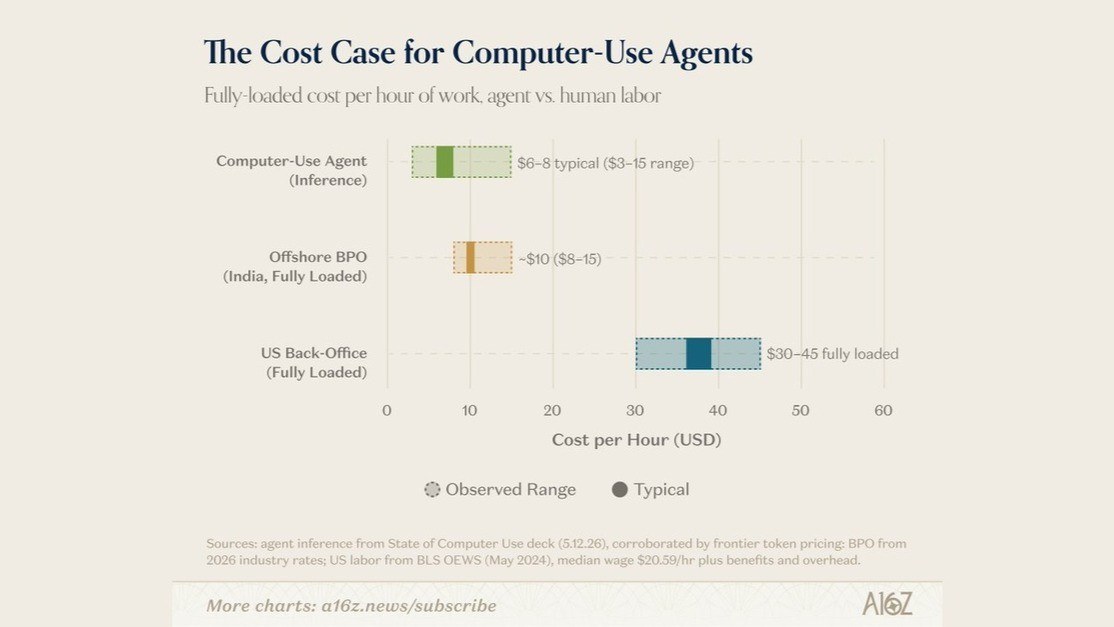
- Costs - This time last year it would cost 2-4 times more than a US worker to run frontier model Computer Use on simple tasks (i.e. updating CRM records)
- Accuracy - Early on, Computer Use models struggled with basic web navigation. For example, if you would ask the AI to scroll down a webpage it would often get stuck in an "infinite scroll".
- Autonomy - In the past the AI could only do one prompt command at a time.
Where Computer Use works today
Computer Use has come a long way since 2024. Costs have plummeted by roughly 10x. Accuracy has shot up from 15% to 85% on OSWorld (well past the ~72% humans score on the same tasks). And AI orchestrator companies have emerged that leverage reasoning models to direct Computer Use toward end-to-end workflows.
As an example, the video below shows a StaffAI Inside Sales Rep gathering leads from a gated web portal. Sales reps spend on average ~3 hours day doing this type of work because the only way to collect this lead data is by manually clicking through a website (web scrapers get blocked).
As the video demonstrates, an AI employee can now do this exact work via Computer Use in a manner indistinguishable from a person. The difference? It runs continuously 24/7 and is a fraction of the cost of a US worker.
Similarly, AI employees are now able to reach out to those leads to negotiate an agreement over SMS/email, and then update each step of the sales process in the CRM just like a human employee (see a live demo). This three step process (gather leads, negotiate, update the CRM) comprises the bulk of inside sales work, and when AI employees are fully onboarded the results can be staggering. One customer, a property broker, cut a struggling department's headcount in half by replacing underperforming sales reps with AI employees. The department is now the #1 EBITDA driver for the company.
Deploying Computer Use in the Enterprise
Now that Computer Use is cheaper than a person and just as accurate in complex workflows, it can be seriously considered as a substitute for API based solutions. This is significant, because for most companies, the main barrier to incorporating AI into their internal workflows is technical (i.e. they need a talented AI expert to develop custom software that integrates AI into all of their internal systems). The fact that Computer Use allows AI employees to use existing human software interfaces and thereby bypass the need for custom integrations relieves a huge impediment for many companies.
With the technical barriers out of the way, business process challenges remain. Here are three challenges we've seen companies have to overcome in order to integrate Computer Use based AI employees into their workforce.
Training
If treated as yet another tool, Computer Use on its own can be as brittle as robotic process automation (RPA) was last decade. This is why the AI employee packaging is so important. If you have an AI harness that allows you to communicate with an AI employee over email/slack, then an everyday employee can coach it on how to perform an internal workflow just like they would a new hire (what "no-code" was always supposed to mean).
However, just like a new hire, you need to spend time training an AI employee; that part doesn't go away, but once trained up to proficiency an AI employee provides autonomy like nothing before.
Data protection
Another benefit of treating AI like an employee is that it addresses one of the biggest fears enterprise leaders have with AI: data sovereignty. If AI accesses enterprise data through an API it can easily acquire 10+ years worth of sensitive data overnight. Even if a vendor claims that they won't do this, the fact that they COULD is a non-starter for most companies.
An AI Employee with Computer Use, on the other hand, can be provisioned the same access control rights as an independent contractor would have in a CRM. This allows for familiar data management policies for HR and IT teams and ultimately limits data exposure.
Trust & Governance
Finally, and perhaps most importantly, companies are grappling with the question of "can I trust it [AI]?". Human employees have many pitfalls, but we all have an innate ability to determine whether or not we trust another person. The same cannot be said of AI.
One measure that has helped our customers at StaffAI is to pair each AI employee with a person (typically a team lead) who is directly responsible for training and managing the AI employee. In the same way a manager would oversee his/her team, the manager takes ownership of the AI employee's outcomes and coaches on escalations.
Implications of Computer Use based AI employees on the workforce
What's coming next for Computer Use based AI employees
Computer Use presents a paradigm shift to how companies have been thinking of AI. If AI can operate a desktop like a person, then work can be completed using the same tools and business processes that company already has in place. Add in a voice/chat interface and the implications are clear: AI employees are capable of taking on many existing desk jobs. What then happens to displaced workers?
There are two encouraging trends we are seeing. First, many companies have so much backlog that they can readily use the extra set of hands. Second, and more significant, is that we're seeing companies change the focus of their staff. When the AI is able to handle perfunctory tasks, human employees have more time to spend on what matters most to the business: building enduring relationships with customers. AI can now click around a desktop, but it can't go out in the field and shake a customer's hand.